


|



How to convert AC3 to APE online with AC3 to APE Converter? Free download AC3 to APE Convertor and convert .AC3 to .APE with the best AC32APE Converter for Windows.
Do you have some .ac3 files that you want to convert to APE files so you can listen to them on your phone? Maybe you can only get your favorite song or lecture in the ac3 format. Fortunately for you, we’ve put together a simple guide for converting AC3 files into APE. With AC3 to APE file converter, you can turn those AC3 files into APEs and be on your way. AC3 to APE Converter offers you an easy and fast way to convert AC3 to APE audio with high quality. Audio Transcoder is an advanced AC3 to APE Converter and Audio CD Ripper with support of various popular audio formats and encoders. It currently converts between MP3, MP2, M4A/M4B/MP4/M4R/ALAC, AIFF, WMA, AC3, Ogg Vorbis, MP3, AAC, WAV and APE formats. People often search for "ac3 to ape converter online" or "how to convert ac3 to ape online" without realizing that uncompressed audio files are large in size and by the time you upload, convert and download the files you are better off downloading AC3 to APE converter on your PC and perform convention locally = 0 second waiting for uploading and downloading. With AC3 to APE Converter you easily rip your audio CDs to APE, FLAC or WMA files for use with your hardware player or convert files that do not play with other audio software. You can even convert whole music libraries retaining the folder and filename structure. The integrated CD ripper supports the CDDB/freedb online CD database. It will automatically query song information and write it to ID3v2 or other title information tags. Have any questions regarding AC3 to APE Converter? See the below Frequently Asked Questions.
Steps on how to convert AC3 to APE:
Free download AC3 to APE Converter, install it and launch it. Then follow the three steps to convert AC3 to APE.
1. Select the AC3 files to convert to APE format.
The first step is to select the files to convert ac3 to ape. Run AC3 to APE Convertor and use the Folder Explorer to browse to the files you want to convert. Then select the file in the File List, drag it to the Drop Zone and drop it there. Optionally, the AC3 to APE Converter allows you to edit the audio tags of any selected file in the Drop Zone.
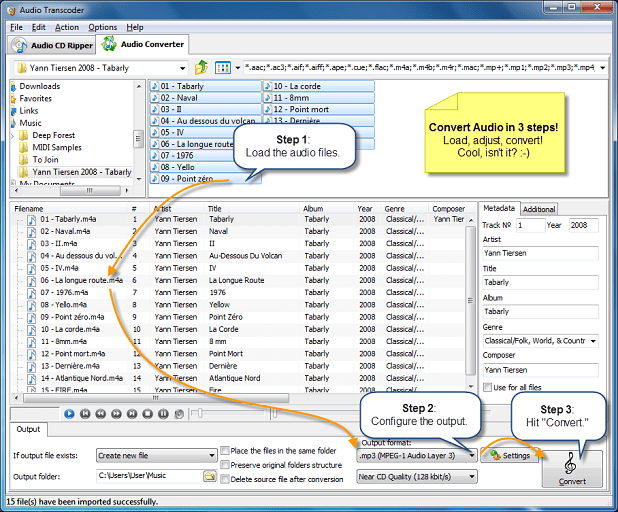
Once the files are selected, the next step is to select the output settings in AC3 to APE Converter.
2. Select the output settings.
The second step is to select the output settings. To begin, select the folder to save the output file to and choose the action to be executed if the output file already exists - create a new file, overwrite or skip the existing file.

You can also set the AC3 to APE Converter to delete a source file after conversion and preserve the the original folder structure, when doing batch conversion.
Finally, you should select the output format and audio quality. In the APE dialog box, choose the format settings for the final APE files. Depending on quality you need, select the bitrate of the file, sample rate and the number of channels. You will probably lose some audio content if you choose the mono option. You can choose what sample rate you want to use. 44.1 kHz (or 44100 Hz) is the sample rate used by audio CDs. Less than that and you'll start to hear the loss in quality.
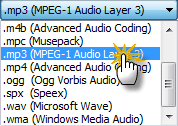
Once the output settings are customized, you go to the final step - ac3 to ape conversion.
3. Start to convert .ac3 to .ape
Click Convert button to start to convert AC3 to APE or other audio format you desired. A conversion dialog will appear to show the progress of ac3 to ape conversion. If you want to stop the process, please click Stop button. After the conversion, you can click the Output Folder button to get the converted files and transfer to your iPod, iPad, iPhone, mp3 player or hard driver.
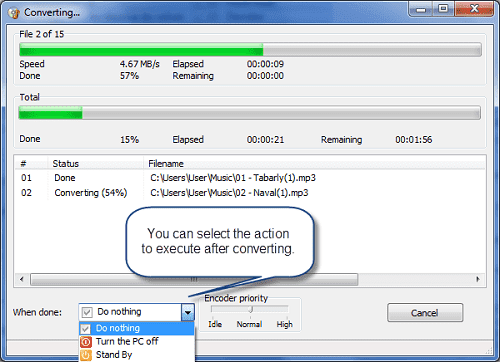
During the turning ac3 into ape, you can change the priority of the process or set an automatic event to be executed when the conversion is over. After the conversion of ac3 to ape has finished, you can find the ape files in the output folder you specified.
With Audio Transcoder you can convert AC3 files for all iOS devices and play AC3 music files on your iPod, iPhone and iPad.
Also you can use AC3 to APE Converter as:
- AC3 to SPX Converter
- AC3 to ALAC Converter
- AC3 to M4R Converter
- AC3 to MP3 Converter
- AC3 to M4A Converter
- AC3 to FLAC Converter
- AC3 to MP4 Converter
- AC3 to AIFF Converter
- AC3 to MP2 Converter
- AC3 to M4B Converter
- AC3 to OGG Converter
- AC3 to MPC Converter
- AC3 to WAV Converter
- AC3 to WMA Converter
- AC3 to AAC Converter
- AAC to MP3 Converter
- AIFF to MP3 Converter
- APE to MP3 Converter
- FLAC to MP3 Converter
- M4A to MP3 Converter
- M4B to MP3 Converter
- M4R to MP3 Converter
- MP2 to MP3 Converter
- MP4 to MP3 Converter
- MPC to MP3 Converter
- WAV to MP3 Converter
- WMA to MP3 Converter
- WV to MP3 Converter
- OGG to MP3 Converter
- SPX to MP3 Converter
- TTA to MP3 Converter
- CDA to MP3 Converter
- OFR to MP3 Converter
- ALAC to MP3 Converter
AC3 to APE Converter System Requirements:
-
Minimum System Requirements
- Microsoft Windows XP/Windows Vista/Windows 7/Windows 8/8.1(32-bit and 64-bit)
- 1.0 GHz or faster processor
- 512 MB RAM
- 10 MB free hard drive space
-
Recommended System Requirements
- Microsoft Windows XP/Windows Vista/Windows 7/Windows 8/8.1 (32-bit and 64-bit)
- Pentium 4 or faster multi-core processor
- 1 GB RAM
- 10 MB free hard drive space
Key features of the AC3 to APE Converter:
- Easy to learn and use, still offers expert options when you need them.
- Full Unicode support for tags and file names.
- AC3 to APE Converter supports most widely used popular input and output audio formats.
- It is capable of converting AC3 to APE easily and quickly.
- Integrated CD ripper with CDDB/freedb title database support. It can copy & save audio tags from the source AC3 files to the destination APE files (ID3v1/ID3v2/APE/Ogg/FLAC tags supported).
- Batch mode for multiple files conversion task, AC3 to APE Converter can convert thousands of AC3 files at once.
- Multi-core optimized encoders to speed up conversions on modern PCs.
- AC3 to APE Converter supports conversion without any temporary files it brings you high converting speed and saves the hard disk resource.
- It is fairly intuitive to use with its Windows Explorer-Style user interface.
- It supports drag & drop.
- It uses the latest AC3 codec and Lame MP3 encoder which is generally believed as the the best MP3 encoder.
- It can join CDA files to one big AAC, ALAC, FLAC, WAV, M4A, M4B, MP3, OGG or WMA.
- AC3 to APE Converter creates output folders according to source files directory tree automatically.
- It can add ID3 tag such as title, artist, album, year, genre, and comment to target file when converting files to MP3/WMA/OGG/WAV/FLAC/APE/MP4/M4A/M4B.
- AC3 to APE Converter supports prevalent operation systems.
Frequently Asked Questions about AC3 to APE Converter
We strongly recommend that you first find answers to your questions here before try to contact us.
Q: What can I do with AC3 to APE Converter?
Q: Will this AC3 to APE Converter work on Windows XXX?
Q: Which audio file formats are supported by AC3 to APE Converter?
Q: Do I lose sound quality when I Convert AC3 files to APE format?
Q: How do I uninstall AC3 to APE Converter in Windows Vista / Windows 7 / Windows 8 / Windows 8.1 / Windows 10?
Q: How do I uninstall AC3 to APE Converter in Windows XP?
Q: How do I uninstall AC3 to APE Converter in Windows 2000?
Q: How do I access the AC3 to APE Converter download for PC?
Q: What is AC3 format?
Q: What is APE format?
Q: How to ask questions, give comments & advises and report bugs?
Q: What can I do with AC3 to APE Converter?
A: You can convert your AC3 files to the popular APE format.
Back to top
Q: Will this AC3 to APE Converter work on Windows XXX?
A: The AC3 to APE Converter download for PC works on most current Windows operating systems.
Back to top
Q: Which audio file formats are supported by AC3 to APE Converter?
A: Input File Formats: 3G2, 3GP, 3GP2, AAC, AC3, DTS, AIF, AIFF, AMR, APE, CDA, FLAC, M4A, M4B, M4R, MO3, MOD, MP+, MP1, MAC, MP2, MP3, MP4, MPC, OGG, SHN, SPX, TAK, TTA, WAV, WAVE64, WMA, WV, IT, XM, PLS, OFR, OFS, S3M, M3U and CUE. Output File Formats: 3G2 (audio track), 3GP (audio track), AAC, AAC for iPod/iPhone/iPad/iTunes, AC3, AIFF, ALAC (Apple Lossless), FLAC, M4A (MPEG-4 audio), M4B (MPEG-4 audiobook), M4R (iPhone ringtone), MP2, MPC, MP3, MP4 (audio track), APE, OGG, WAV, WMA and any ACM Encoder.
Back to top
Q: Do I lose sound quality when I Convert AC3 files to APE format?
A: NO. Since APE is a lossless audio format.
Back to top
Q: How do I uninstall AC3 to APE Converter in Windows Vista / Windows 7 / Windows 8 / Windows 8.1 / Windows 10?
A: Click “Start”
Click on “Control Panel”
Under Programs click the Uninstall a Program link.
Select “AC3 to APE Converter” and right click, then select Uninstall/Change.
Click “Yes” to confirm the uninstallation.
Back to top
Q: How do I uninstall AC3 to APE Converter in Windows XP?
A:Click “Start”
Click on “Control Panel”
Click the Add or Remove Programs icon.
Click on “AC3 to APE Converter”, then click “Remove/Uninstall.”
Click “Yes” to confirm the uninstallation.
Back to top
Q: How do I uninstall AC3 to APE Converter in Windows 2000?
Click “Start”
Click on “Control Panel”
Double-click the “Add/Remove Programs” icon.
Select “AC3 to APE Converter” and right click, then select Uninstall/Change.
Click “Yes” to confirm the uninstallation.
Back to top
Q: How do I access the AC3 to APE Converter download for PC?
A: It’s easy! Just click the AC3 to APE Converter download button at the page. Clicking this link will start the installer to download AC3 to APE Converter free for Windows.
Back to top
Q: What is AC3 ?
A: AC3 is a file extension for surround sound audio files used on DVDs format. AC3, the abbreviation of Audio Coding, is the synonym of Dolby Digital audio codec. Dolby Digital (code-named AC3) is a compressed, lossy surround sound format that boomed with the rise in popularity of DVD in the late 1990s and early 2000s. The AC3 file format was created by Dolby Labs for use in a Dolby Digital audio on DVD, Blu-ray and other digital video formats. AC3 stands for Audio Coding 3. Except for Dolby TrueHD, the audio compression is lossy. And Dolby Digital is the common version containing up to six discrete channels of sound. AC3 increases fidelity over its previous surround sound standard, Pro-logic, with independent tracks for each of the 6 speakers, a 16bit sampling at 48khz rate compressed by 10-12 times, making for a total bit rate of 384kbps.
Back to top
Q: What is APE ?
A: Monkey's Audio is an algorithm and file format for lossless audio data compression. Monkey's Audio does not discard data during the process of encoding, unlike lossy compression methods such as AAC, MP3, Vorbis and Musepack. Data file compression is employed in order to reduce bandwidth, file transfer time, or storage requirements. A digital recording (such as a CD) encoded to the Monkey's Audio format can be decompressed into an identical copy of the original audio data. As with the FLAC and Apple Lossless format, files encoded to Monkey's Audio are typically reduced to about half of the original size, with data transfer rates and bandwidth requirements being reduced accordingly. Monkey's Audio's advantages are better compression rates compared to FLAC and WavPack, as well as multithreading/multicore support.
Back to top
Q: How to ask questions, give comments & advises and report bugs?
A: Please contact us.
Back to top